VisionPerformance.Store

Automobiles Classic Garage
Product Purchase
Call 305 389 0928 ask for Albert
Free Shipping USA over $500.00.
AMA Optics,Inc
Instruments
Hand Made USA
Call 305 389 0928
Starts at $1000.00
Built for 21 Years, Clinically Proven to Predict post-op vision, Pre-op!
Predicts the Future
Made in USA
Apple Store Apps
(Order app)
1. Fovea Test (Macular)
Self-test Person
One Test Type (Macula)
MacHealth.pro
99 Cents/30 Tests
(Order)
2. Fovea Test (Macula)
Professional
10 Test Type
CPT code 92284
Amblyopia
Easy to use, data stored, email results. Must wear special glasses for some tests.
Get at www.amaoptics.com
Scroll
Down⬇
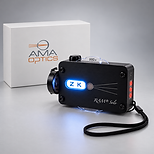
Glare Tester
Starts at $925.00
Dual Bulbs, Spot light and Flood light
Rechargeable
Call 305 389 0928




DiagnosticGame
Patent
MacHealth
Patent
MacDx
Press
Release
Waiting 100 Years for Adaptation

Tap to Watch
NEWS

Amblyometer Tutorial Gallery
Click any image to see Slideshow

CHOOSE AMBLYOMETER


Determines if subject understands BRIGHTNESS! Repeat if needed. Dont't play Game unless subject knows which image is BRIGHTER!

No GLASSES! The subject must choose the brighter image to avoid an ERROR message.

Do not PLAY unless subject knows which image is BRIGHTER!
Choose NO Parity. Touch PLAY.

Put on glasses, insure the test images are on the side of the Partner Screen Filters. Set rotation on LOCK (red) in iPad settings.

Choose the BRIGHTER image, TOP or BOTTOM. Watch for bobbing, the rhythmic aimless bottom-top-bottom-top clicking of young children. This will lead to errors.

In the right lower corner is a "0.0", indicating to imbalance of brightness. 0.3 log units is within normal range. Repeat the test at least once or until consistent scores.
Put on the Polarizing Glasses.
Choose the BRIGHTER spaceship.
Notice "0.0" in right lower corner, same as test #1. Can do Parity to verify a balance system.